


Your Payroll Just Got Even Smarter.
We’re thrilled to unveil one of our most anticipated releases yet — the Crystal Payroll Leave Calendar, now live and free-of-charge for all Crystal Payroll customers.
This brand-new tool has now officially launched across the Employer and Manager portals. After months of refinement, testing, and polish, we’re proud to bring you a feature that makes New Zealand leave management, rostering planning, and payroll compliance easier than ever.
This is not just another add-on.
This is a powerful upgrade to your NZ payroll software, designed to give employers and managers clearer visibility, faster decision-making, and smoother workflows.
What the Leave Calendar Offers
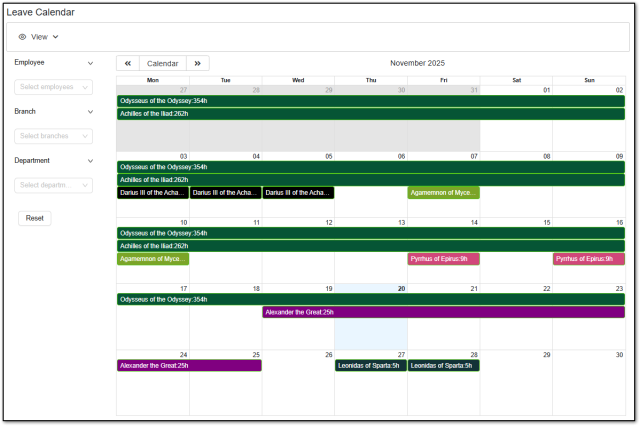
The Leave Calendar gives you an instant, at-a-glance view of all employee leave across your business. Whether you’re managing a team of 5 or 500, you can see upcoming leave for the entire month, helping you plan rosters, manage workloads, and stay compliant with New Zealand employment law.
You can filter by:
- Employee
Branch - Department
You can also choose between:
- Monthly view for big-picture planning
- Weekly view for detailed day-to-day oversight
This makes it easier than ever to track annual leave, sick leave, public holidays, alternative leave, and more — all in one clean, visual interface.
Accessing the Leave Calendar
Employer Login
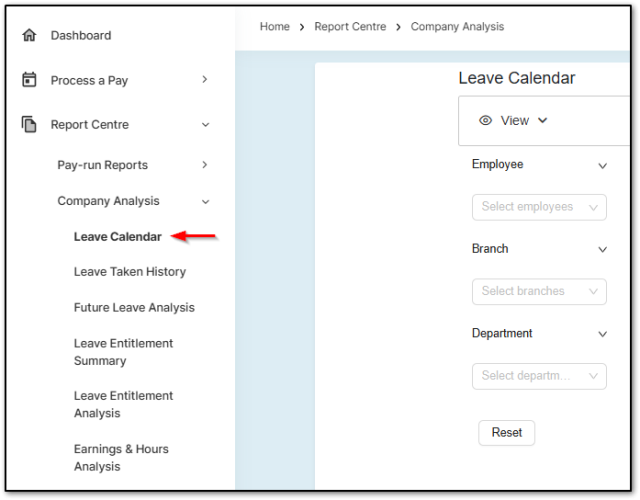
To access the Leave Calendar from your Employer Login:
- Go to “Report Centre”
- Select “Company Analysis”
- Choose “Leave Calendar”
If you are set up as a Branch or Department administrator, don’t worry — the system automatically ensures you only see the areas you’re permitted to manage.
Crystal Payroll continues to support strong payroll security and user access control, keeping sensitive information protected at every level.
Manager Login
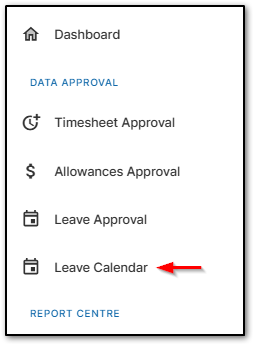
Managers can access the Leave Calendar by heading to:
“Leave Calendar” under “Data Approval”
Managers will only see employees they are authorised to manage, ensuring privacy, compliance, and accurate delegation within your payroll system.
Prefer to Hide the Leave Calendar for Certain Users?
No problem — control remains in your hands.
If you’d like to restrict access for particular Company User Groups, you can easily disable the Leave Calendar.
To adjust access:
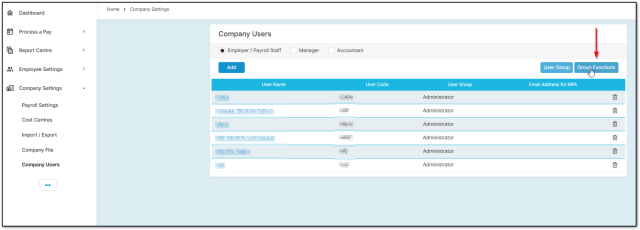
- Open “Company Settings”
- Go to “Company Users”
Select “Group Functions” on the right-hand side
For Employer User Groups
Disable the option under Report Centre
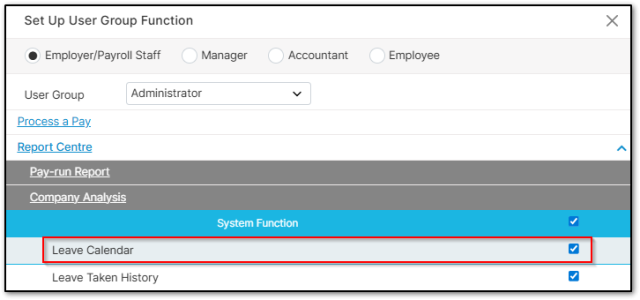
For Manager User Groups
Disable the option under Data Approval.
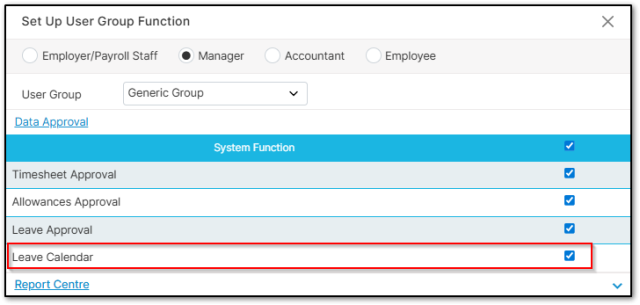
This gives you complete flexibility over how your business uses the feature.
Why This Matters for NZ Businesses
The Leave Calendar is a step forward in helping New Zealand businesses achieve:
- Better leave planning
- Fewer payroll errors
- Improved staff scheduling
- Greater transparency
- Easier Holidays Act compliance
- Stronger HR and payroll alignment
It’s exactly the kind of smart, practical tool that supports busy Kiwi employers and managers every single week.
We’re incredibly proud of this release, and we hope it enhances your payroll and leave management experience.
This is just one of many powerful new features we’ve been working on behind the scenes. We can’t wait to show you what’s coming next — and yes, this Leave Calendar is completely free for all customers. For any questions or feedback about the Leave Calendar, our support team is happy to help. Contact us at support@crystalpayroll.co.nz or give us a call at (09) 480 0123.